💡 Key Takeaway
What Is Power Automate?
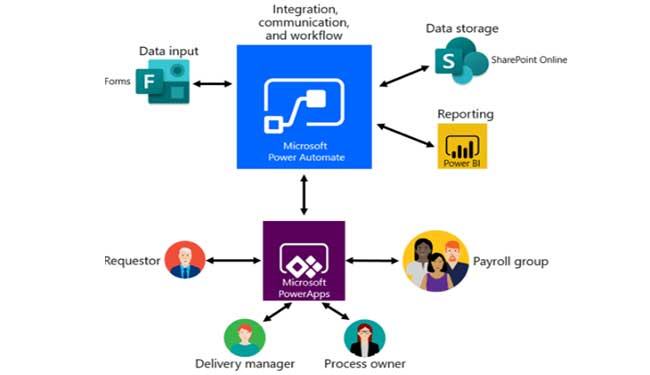
The online workflow service which let’s automate actions across the most common apps and service are the Power Automate. With the help of Power Automate, you can create a lead to your Microsoft Dynamics 365 and manage the record to ClickDimensions whenever a post regarding your company is mentioned on the social media.

The list of applications that you can get connected to with Power Automate is constantly growing.

How can you use Power Automate for your daily work routine?
Power Automate works between your favourite applications, collect data, get notifications and even sync files and much more.
For example, you can Power Automate tasks such as
- A common use is to receive notifications. For example, whenever a sales lead is created to Microsoft Dynamics 365 for Salesforce, you can power automate an email or create a push notification to receive alerts on your email.
- Also, you can connect your social media account and monitor what people are commenting on your business with the help of flow/Power Automate. The flow can then connect this data to Power BI to spot trends and analyze them for future references.
- The beauty is it works on the platform so seamlessly that you can use it for approvals for vacation on the SharePoint portal.
WHAT’S NEXT?
Power Automate has much more to do and you should definitely try a flow and we at Business Experts Gulf will guide with customized Power Automate on your applications
Power Automate is also a practical fit for finance teams preparing for Microsoft Dynamics UAE e-invoicing. With the UAE’s FTA-aligned e-invoicing rules coming into effect, businesses running Microsoft Dynamics 365 need invoices that are generated, validated and shared in a structured digital format. Power Automate flows can trigger the moment an invoice is posted in Dynamics 365, route it for approval, send the data to your accredited e-invoicing provider, and notify your accounts team if a submission fails. This reduces manual re-entry, lowers the risk of compliance errors and keeps your finance process consistent as regulations evolve.
Frequently Asked Questions
1. What is Microsoft Power Automate?
Power Automate is a Microsoft cloud service that lets you build automated workflows (called flows) between apps and services. It reduces manual, repetitive work such as sending notifications, collecting approvals and moving data between systems.
2. What can businesses automate with Power Automate?
Common examples include lead alerts from Dynamics 365, leave and expense approvals on SharePoint, document routing, email notifications, social media monitoring and report updates in Power BI. If a task follows clear rules, it can usually be automated.
3. Does Power Automate work with Microsoft Dynamics 365?
Yes. Power Automate connects with Dynamics 365 so you can trigger actions when records are created or updated, such as alerting a sales rep about a new lead or routing an invoice for approval.
4. Can Power Automate help with e-invoicing in the UAE?
Yes. Flows can trigger when an invoice is posted in Dynamics 365, route it for approval, send the data to an accredited e-invoicing provider and alert your finance team if a submission fails. This reduces manual entry and the risk of compliance errors.
5. How can I get started with Power Automate in the UAE?
Start by listing the repetitive tasks that take the most time, then choose one process to automate first. A Microsoft partner such as Business Experts MEA can help you design, build and customize flows for your business.